Cloud computing has transformed from a futuristic concept into the backbone of modern business. If you’ve ever wondered what actually happens when you save a file to “the cloud,” you’re essentially looking at a complex but elegant system of cloud architecture. For beginners, understanding the components of cloud systems can feel like learning a new language. However, at its heart, cloud computing refers to the delivery of on-demand computing services – including servers, cloud storage, and databases – over the internet.
Whether you are looking to deploying cloud services for a small project or trying to understand how a global service provider like Google Cloud manages billions of users, the secret lies in the cloud computing architecture. This guide will break down the cloud computing components that make this magic possible.
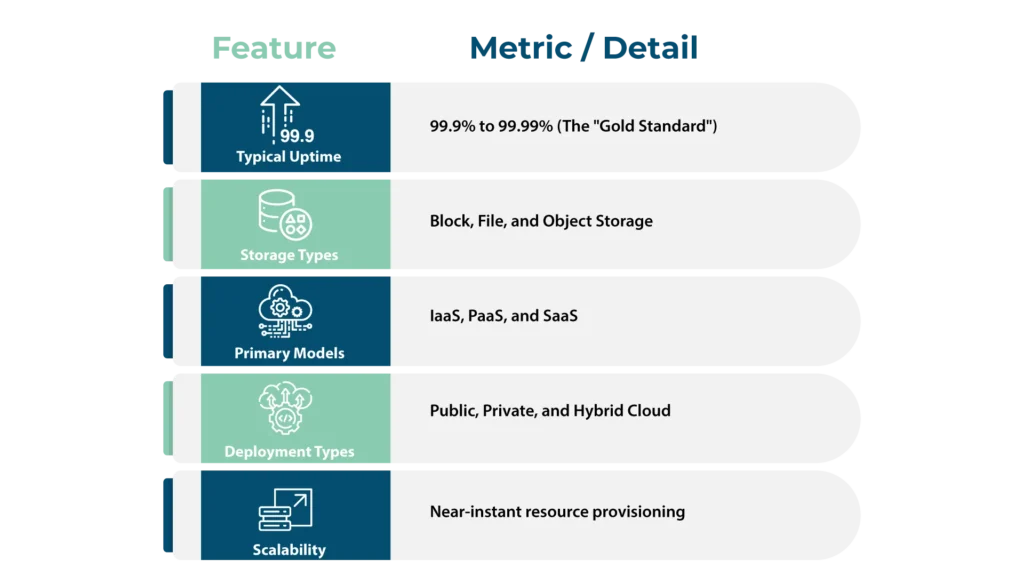
Informative Snippet: Cloud Metrics at a Glance
| Feature | Metric / Detail |
| Typical Uptime | 99.9% to 99.99% (The “Gold Standard”) |
| Storage Types | Block, File, and Object Storage |
| Primary Models | IaaS, PaaS, and SaaS |
| Deployment Types | Public, Private, and Hybrid Cloud |
| Scalability | Near-instant resource provisioning |
What is Cloud Architecture?
To understand how the cloud works, we must first look at the blueprint. Cloud architecture refers to how various cloud technology components interact and connect to create cloud computing environments. Think of it as the architectural plan for a skyscraper; it dictates how the plumbing (data), electricity (computing power), and rooms (cloud resources) are integrated so that resources can be pooled, shared, and scaled over a network.
Essentially, cloud architecture consists of two main parts: the front end that customers use and the back end that the host manages. This cloud computing architecture acts as a blueprint that defines the best way to strategically combine resources to build a cloud environment for a specific business need. Without a solid cloud architecture, managing cloud-based solutions would be chaotic and inefficient.
Understanding the Components of Cloud Systems
When we ask, “What are the components of a cloud?” we are generally looking at the synergy between the user’s device and the provider’s data center. The cloud computing system combines physical hardware, a virtualization layer, and software, delivering on-demand applications and services through a front-end interface.
The Front End: Client Infrastructure
The front end is what you, the user, see every day. This client infrastructure consists of user interfaces, client-side applications, and the client device or network that enables users to access cloud services. Whether you are using a web browser or a mobile app, you are interacting with a graphical user interface designed for resource management.
The Back End: The Powerhouse
The backend component of cloud computing is where the heavy lifting happens. It includes the hardware components, software, and security mechanisms that support cloud services and manage resources. In this section of the cloud architecture, you’ll find:
- Computing Resources: The actual physical servers and CPUs.
- Storage Services: Systems for storing data across different levels.
- Management Software: This coordinates communication between the backend component and the frontend cloud architecture components.
The Four Components of Cloud Infrastructure
If you want to get technical, cloud infrastructure comprises four primary layers. These hardware components and software layers are the “nuts and bolts” of any scalable cloud infrastructure.
1. Physical Hardware
The physical foundation of cloud infrastructure includes servers, storage arrays, routers, and switches located in massive physical data centers. This is the actual gear that cloud providers maintain so you don’t have to.
2. Virtualization Technology
This is the “secret sauce” of cloud computing. Virtualization technology uses a hypervisor to decouple software from physical hardware, allowing multiple virtual machines to share the same hardware securely. This efficiency is why cloud computing services are so cost-effective.
3. Cloud Storage
Data storage in the cloud isn’t just one big hard drive. It is categorized into block storage for databases, file storage for shared systems, and object storage for unstructured data. Cloud storage allows multiple clients to access data simultaneously and provides scalable solutions for any volume.
4. Network Infrastructure
The network infrastructure in cloud infrastructure facilitates safe data management and traffic routing. It connects front-end users to back-end resources using load balancers, firewalls, and routers. The Internet serves as the medium through which these components communicate.
Cloud Computing Architecture: How It All Works Together
So, how does cloud architecture work in real-time? It all starts with a user request. When you interact with a cloud platform, the management software identifies available computing resources. Then, the hypervisor creates virtual machines to fulfil your request.
Cloud architecture dictates how these components are integrated so that resources can be pooled and shared. This orchestration ensures that cloud computing environments remain stable even when millions of people are storing data or running applications at the same time. Cloud architects spend their careers optimizing this flow to reduce it operating costs and improve performance.
Exploring Cloud Service Models
When you look for a cloud service provider, you’ll encounter different ways to consume cloud computing. These are often called cloud application services or delivery models.
Software as a Service (SaaS)
Often referred to as cloud application services, SaaS allows users to access applications via a web interface without needing to install software locally. Examples include Gmail or Microsoft 365.
Platform as a Service (PaaS)
PaaS provides a platform for users to create, edit, and launch software applications. It provides the necessary back-end infrastructure, like the runtime cloud, so developers can focus on code rather than hardware components.
Infrastructure as a Service (IaaS)
IaaS is the most flexible cloud-based delivery model. It allows users to manage their software and applications while the service provider provides the underlying computing infrastructure, such as Google Compute Engine.
Public, Private, and Hybrid Cloud Architecture
Not all cloud environments are the same. Depending on deployment models, an organization might choose:
- Public Cloud: Resources are shared among multiple users and managed by a third-party service provider. A public cloud architecture is great for scale resources quickly.
- Private Cloud: This is a cloud platform dedicated solely to one organization. Private cloud architecture offers higher data security and control.
- Hybrid Cloud: A hybrid cloud architecture combines public and private clouds. This allows businesses to keep sensitive data in a private cloud while using the public cloud for heavy processing.
Benefits of Modern Cloud Technology
Why are so many businesses moving to cloud-based solutions? The advantages go beyond just simple data storage.
- Cost Efficiency: Cloud computing can lead to reduced it operating costs by minimizing the need for physical hardware investments. You only pay for what you use.
- Scalability: This is a significant benefit, enabling users to quickly scale resources as needed to meet demand.
- Disaster Recovery: Cloud computing can enhance data backup and recovery processes. In the event of a crash, disaster recovery is much faster when your data is mirrored across multiple physical data centers.
- Mobility: Cloud computing enhances mobility by allowing access to applications and data from any internet connection.
Addressing Security and Challenges
While cloud technology is revolutionary, it isn’t without risks. Data security is a primary concern because storing data with external cloud providers can expose it to potential breaches.
To combat this, security mechanisms are built into the cloud architecture to protect cloud resources, systems, and files. These include virtual firewalls, access controls, and encryption. Integrated security mechanisms protect the entire cloud infrastructure using methods like IAM (Identity and Access Management).
Another challenge is “vendor lock-in,” where organizations face difficulties switching between multiple cloud providers due to proprietary technologies. However, with the right cloud strategies, these hurdles can be managed effectively.
Conclusion: Navigating Your Cloud Journey
Understanding the components of cloud computing is the first step toward mastering the digital landscape. From the client infrastructure you touch to the physical hardware hidden in data centers, every part of the cloud computing architecture plays a vital role. By strategically managing cloud based solutions, businesses can achieve faster time to market and significantly lower their operating costs.
The world of cloud computing is vast, but it is built on these fundamental key components. As you begin deploying cloud services, remember that the cloud is not just a place, it’s a sophisticated cloud computing system designed to help you innovate and grow.
Ready to move beyond manual management?
Experience the future of autonomous operations with Cloudeva.ai, where AI-first intelligence transforms your multi-cloud infrastructure into a self-managing powerhouse.
Keynote Summary: A beginner-friendly breakdown of cloud architecture: what it is, how it works, and the models that power it. Cloud computing delivers on-demand compute, storage, and databases over the internet via IaaS, PaaS, and SaaS models, across public, private, and hybrid deployments. Typical uptime is 99.9–99.99%; scaling is near-instant.
FAQs:
What is cloud computing?
On-demand delivery of computing services – servers, storage, databases, networking – over the internet.
What are the three main cloud service models?
IaaS (infrastructure), PaaS (development platform), and SaaS (software).
What is the difference between public, private, and hybrid cloud?
Public = shared, provider-managed; Private = dedicated, enterprise-managed; Hybrid = combination of both.
What is cloud architecture?
The blueprint for how cloud components interact -compute, storage, networking, and virtualization layers.
What storage types exist in the cloud?
Block storage, file storage, and object storage – each suited to different workload types.